NotesXSLTransformer: Transforming XML and DXL with XSLT in LotusScript
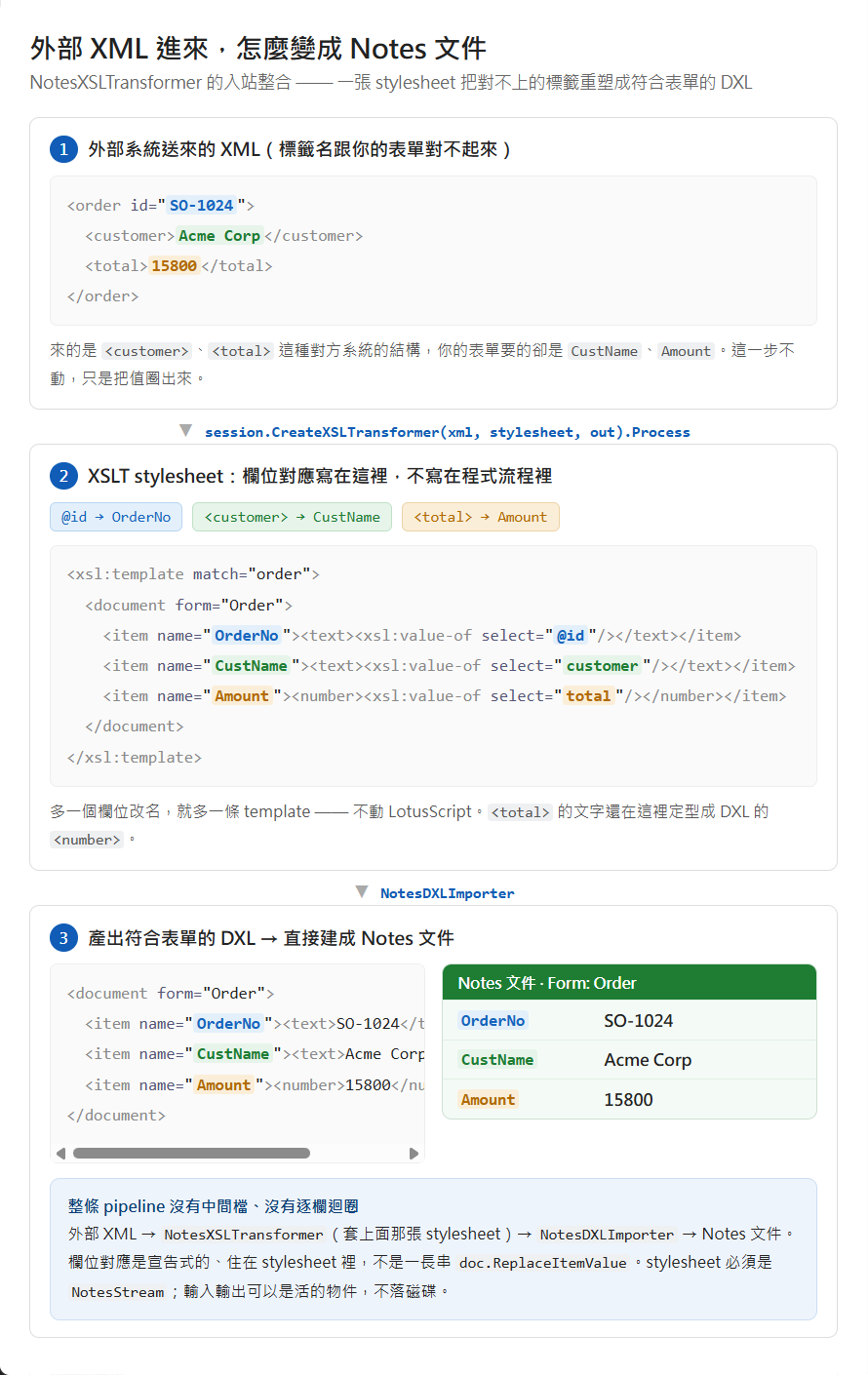
An external system hands you a chunk of XML — a batch of orders, or an HR roster — and you need it as Notes documents. The problem is the tag structure doesn’t line up with your form: what arrives is <order><customer>, and your form wants fields named CustName, OrderNo. You could write a loop that parses the XML element by element and calls doc.ReplaceItemValue field by field — or you write one XSLT stylesheet that reshapes that foreign XML straight into DXL matching your form, and hand it to NotesDXLImporter to create the documents. The engine that does the reshaping is NotesXSLTransformer — “the transformation of DXL (Domino XML) data through XSLT.” It’s the last member of the LotusScript XML family, alongside the DOM and SAX parsers, slotting into the same stream-based pipeline. The same engine runs the other direction too: export documents to DXL, then transform them into whatever shape another system expects.
TL;DR
- Create it from the session:
Set xsl = session.CreateXSLTransformer(input, styleSheet, output)— all three arguments optional (set later withSetInput/SetStyleSheet/SetOutput), then callProcess. - The stylesheet must be a
NotesStream. Input can be a String,NotesStream, or another XML processor (NotesDOMParser/NotesSAXParser/NotesDXLExporter); output can be aNotesStream, a parser, aNotesDXLImporter, or aNotesRichTextItem. - Don’t read or write the file-backed streams yourself before handing them over — “You cannot explicitly read or write a NotesStream object associated with a file prior to using it for XML input or output” (checking
Bytesis fine). - Error handling is via
On Error+ thelsxbeerr.lssconstants and the read-onlyLogproperty — there are no events. (UnlikeNotesSAXParser, which raises SAX event handlers.) - Pipelining: the output of one XML process can be the input to the next, so you can chain
NotesDXLExporter→NotesXSLTransformer→NotesDXLImporterwith no temporary files. New in Release 6; not supported in COM.
The three-stream pattern
The everyday shape is three NotesStreams — the XML input, the XSL stylesheet, and the output — wired into the transformer. This is the official example (reading hello.xml, applying hello.xsl, writing hello.txt):
%INCLUDE "lsxbeerr.lss"
Sub Initialize  On Error lsERR_NOTES_XSLT_INPUT_OBJECT GoTo err_IN  On Error lsERR_NOTES_XSLT_OUTPUT_OBJECT GoTo err_OUT  On Error lsERR_NOTES_XSLT_STYLESHEET_OBJECT GoTo err_SS
  Dim session As New NotesSession  Dim XML_in As NotesStream, XSL_ss As NotesStream, XML_out As NotesStream
  Set XML_in = session.CreateStream  If Not XML_in.Open("c:\dxl\hello.xml") Then Exit Sub  If XML_in.Bytes = 0 Then Exit Sub          ' checking Bytes is allowed
  Set XSL_ss = session.CreateStream  If Not XSL_ss.Open("c:\dxl\hello.xsl") Then Exit Sub   ' stylesheet MUST be a stream
  Set XML_out = session.CreateStream  If Not XML_out.Open("c:\dxl\hello.txt") Then Exit Sub  XML_out.Truncate                            ' clear stale output
  Dim transformer As NotesXSLTransformer  Set transformer = session.CreateXSLTransformer(XML_in, XSL_ss, XML_out)  transformer.Process  Exit Suberr_IN:  MessageBox "XSL Input error",, "XSLTransformer" : Exit Suberr_OUT:  MessageBox "XSL Output error",, "XSLTransformer" : Exit Suberr_SS:  MessageBox "Style Sheet error",, "XSLTransformer" : Exit SubEnd Sub
The important habits are all here: open each file-backed stream but don’t read or write it yourself (checking Bytes = 0 to confirm the input exists is the one exception), Truncate the output stream so old content is cleared, and let a single Process run the whole transform.
Errors go through Log, not events
This is where the class differs from its SAX sibling and where a wrong assumption wastes time: NotesXSLTransformer has no event model. There are no XSLT_* callbacks to wire up. Error handling is two things instead. First, On Error with the backend error constants that %INCLUDE "lsxbeerr.lss" brings in — lsERR_NOTES_XSLT_INPUT_OBJECT, _OUTPUT_OBJECT, _STYLESHEET_OBJECT — which is how the official example distinguishes an input problem from a stylesheet problem. Second, the read-only Log property, “an XML representation of warnings, errors, and fatal errors generated by the processor,” which you can read after Process for detail; ExitOnFirstFatalError controls whether processing stops at the first fatal error. If you came expecting a SAX-style handler, that’s the section to re-read.
Pipelining: skip the temp files
The reason the transformer takes parsers and DXL objects as input/output, not just streams, is pipelining — “combine operations so that the output of one XML process becomes the input to another.” Here’s a concrete one: you’re moving a batch of documents from an old database into a new one whose form design differs — a field was renamed, Cust in the old, CustomerName in the new form. Instead of a LotusScript loop that copies each document and renames the field by hand, you chain three objects:
NotesDXLExporter(export the old DB’s documents to DXL) →NotesXSLTransformer(a stylesheet that rewrites<item name='Cust'>to<item name='CustomerName'>) →NotesDXLImporter(write the rewritten DXL into the new DB).
That stylesheet does exactly this node-level rewrite:
<!-- in --> <item name='Cust'><text>Acme</text></item><!-- out --> <item name='CustomerName'><text>Acme</text></item>The field mapping lives in the declarative stylesheet, not in the flow of your code — add another rename and it’s one more template, no LotusScript change. The stylesheet is still a NotesStream, but the XML input and output become live objects, and no intermediate file touches disk. AddParameter lets you pass top-level <xsl:param> values into the stylesheet, so one transform can be parameterised per run (a target form name, say, or a batch code).
What about Java and SSJS?
| LotusScript | Java | SSJS / XPages |
|---|---|---|
session.CreateXSLTransformer(...) → NotesXSLTransformer | session.createXSLTransformer(...) → XSLTransformer | session.createXSLTransformer(...) |
Java has an equivalent lotus.domino.XSLTransformer, but it isn’t a 1:1 mirror — the Java DXL/XSLT path uses the JAXP-style result-target model (XSLTResultTarget built from a FileOutputStream or StringWriter) rather than the stream trio. SSJS reaches the same backend factory method through the session. The core idea — feed XML/DXL and a stylesheet, get transformed output, and prefer pipelining over temp files — carries across all three.