XPages Save Conflicts: Why You Get One Even When You're the Only User
You hit Save and up pops “Document has been saved by another user - Save created a new document as a response to that modified document.” You pause: you’re the only one touching this document — no colleague, no second tab — so how did “another user” save it? Open the database and sure enough, there’s an extra conflict document. And it only fires now and then, which makes it the worst kind to chase.
This is a rarely-explained old XPages trap: on the same document, you’ve mixed the dominoDocument data source’s save with a back-end Document save. This piece starts from how Domino decides a conflict, breaks down assono’s classic 2013 reproduction, and — because that post is old — actually re-runs it on Domino 12.0.2 and 14.5.1 to see whether the trap still bites.
TL;DR
- A save conflict doesn’t need two people: as soon as one document has been saved along two divergent lines of edits, Domino keeps one and demotes the other to a conflict — a single user can manufacture that alone.
- The common XPages trigger: save the
dominoDocument(doc.save()), then grab its back-enddoc.getDocument(), change a field andsave()that, then save thedominoDocumentagain — two APIs saving the same document independently, and Domino’s version check no longer lines up. - The official mechanism: Domino uses
$Revisions(which records the time of each edit) to decide which document is the main one and which become conflict responses. - How to avoid it: collapse to a single save path (assono’s fix: drop the extra save, or work only with the back-end classes); the data source’s
concurrencyModecontrols behavior on a genuine collision; document locking is for real concurrency.
First: how Domino “spawns” a conflict document
Save conflicts aren’t an XPages thing — they’re an old Domino data-layer mechanism. The official docs put it plainly: when “the same document is edited and saved by two separate editing sessions,” Domino can only keep one as the main document and demotes the rest:
“The document edited and saved the most times becomes the main document; other documents become Replication or Save Conflict documents.”
The decision runs on the $Revisions field, which records the date and time of each edit-and-save:
“Domino uses the
$Revisionsfield, which tracks the date and time of each document editing session, to determine which document becomes the main document and which documents become responses.”
The load-bearing phrase is “two separate editing sessions”: Domino checks whether your save follows the version currently on disk. If the revision sequence you hold no longer lines up with the one on disk (because it was already advanced), Domino treats yours as a different line of edits and demotes it to a conflict. It never cares whether it was the same person — which is exactly why one user can collide with themselves.
The XPages trigger: two APIs saving the same document independently
Now put that mechanism into XPages. On an XPage you usually hold a dominoDocument data source (var="doc"). Underneath it is a back-end NotesDocument, reachable via doc.getDocument(). The trouble starts when you save at both layers.
assono’s post (2013) gives a minimal sample that reproduces it reliably; the logic is:
doc.save(); // 1) save the data sourcevar backend = doc.getDocument(); // 2) grab its back-end Documentbackend.replaceItemValue("Note", "touched by back end");backend.save(); // the back end saves again (disk version advances)doc.save(); // 3) the data source saves again — but its version is now staleAt step 3 the dominoDocument still thinks it follows step 1, unaware that step 2’s back-end save already pushed the on-disk version forward a notch. So this save, in Domino’s eyes, is a different line of edits → demoted to a conflict. assono also found that leaving a time gap between saves (he used Thread.sleep) makes it fire reliably; without a gap it may not — which explains why in the wild it “only sometimes” bites.
assono’s own fix is blunt: drop the redundant
dominoDocumentsave and it’s gone; more fundamentally, “the best way would be to work only with the back end classes” — one API, one save path, for the whole document.
(This is exactly why, in the XPages multi-select attachment delete piece, we deliberately avoided the back-end getDocument().remove() and stayed at the data-source layer — to sidestep this very conflict.)
This is a 2013 post — does it still happen on R12 / 14.5.1?
assono’s post is over a decade old, and Domino has turned several major versions since. So we built a minimal XPage from his sample (save → modify the back end → save again, with a 3-second gap between) and ran it a few times on Domino 12.0.2 and 14.5.1 to see whether the trap is still there.
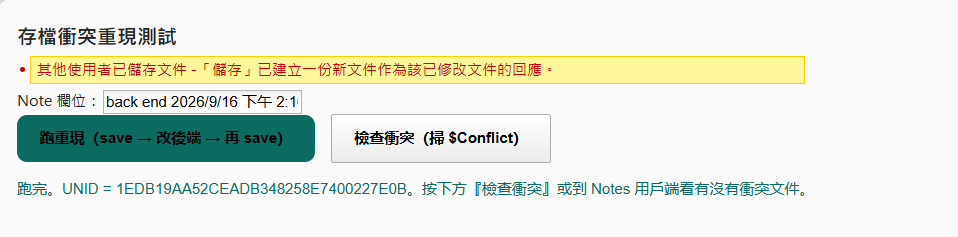
The answer is blunt: both versions still do it, and every single run produces a conflict document — reliably, not intermittently. Using a button that counts $Conflict documents across the database, each press of “run the repro” bumps the count by +1 (on both 12.0.2 and 14.5.1).
More directly, the page’s xp:messages spat out the classic message on the spot:
“Document has been saved by another user - Save created a new document as a response to that modified document.”
— nothing but our own code touched that document from start to finish, yet up came “saved by another user.” That’s the paradox from the opening, made concrete: Domino’s conflict detection only cares whether there are two lines of edits, not how many people are involved.
In other words, this 2013 trap still holds all the way to 14.5.1 — it’s not some transient bug in an old release, but the inevitable result of mixing two save paths on the same document.
And the time gap is the trigger. With the two Thread.sleep(3000) calls in place, both versions conflict on every run; remove them so the two saves land in the same instant, and no conflict is created. That matches assono’s observation, and it’s exactly why the trap “only sometimes” bites in the wild: whether you collide depends on whether enough time opened up between the two saves ($Revisions decides by timestamp). A slightly slow server, or a slow operation wedged between the two saves, opens that gap — and up comes the conflict. Which is also why it’s so hard to diagnose.
How to avoid it
- Collapse to a single save path: on one document, don’t mix data-source
doc.save()with back-enddoc.getDocument().save(). Go entirely through the data source, or entirely through the back end — never interleave. That’s the real cure. - Don’t double-save: within one action, don’t save the same
dominoDocumenttwice; make all your changes before the single save. concurrencyMode: thedominoDocumentdata source has aconcurrencyModeproperty — the docs say it “Specifies the handling of concurrent updates if multiple users update a document at the same time,” with valuescreateResponse,fail,exception,force. It governs what happens on a genuine concurrent update (e.g.failmakes the save fail rather than silently spawn a conflict); useful for real concurrency, but the single-user self-collision above is still rooted in mixing APIs — fix that at the save path.- Lock only for real concurrency: multiple people editing at once is where document locking earns its keep.
Wrap-up
The most counter-intuitive thing about save conflicts is that they have nothing to do with how many people are involved — only with whether one document got saved along two lines of edits. The easiest way to collide with yourself in XPages is to mix the dominoDocument data source with the back-end Document, saving both on the same document. Recognize the trap, collapse the save to one path, and most “single-user save conflicts” simply vanish. For what “stay at the data-source layer, never touch the back end” looks like in code, see XPages multi-select attachment delete.