
Multi-Select Attachment Delete in XPages: Native Deletes One at a Time — Add 'Check Several, Delete on Save'
An XPages document holds several attachments and you want to drop a few of them. In the classic Notes client that’s a couple of clicks, but on the XPages web the official File Download control, even with allowDelete="true", in practice gives you one delete link per row — one file at a time — with no native “check several, delete together.” Search OpenNTF and the community and you’ll find plenty of multi-file upload controls and read-only attachment lists, but a “select several attachments and delete them at once” is almost nowhere to be found. Even a fairly complete production XPages form I have on hand (custom upload button, hand-built download table) still has no multi-select batch delete in its list.
This piece fills that gap — and fills it the right way: keep the “commit on save” behavior of the native XPages delete, and only add the missing multi-select. It’s the closer of the attachments series, after multi-file upload and delete-by-criteria in LotusScript and the classic-web %%Detach checkbox delete; this one is the XPages take.
TL;DR
- Native is one-at-a-time:
xp:fileDownload’sallowDeleteis a per-row delete link, file by file — no multi-select batch. The community has almost nothing off-the-shelf for it either. - A counter-intuitive good thing: the native XPages attachment delete actually commits on save (tested on Domino 12.0.2) — it’s well-behaved, the opposite of a back-end LotusScript agent that changes the document before the user commits.
- Add multi-select with the official API:
NotesXspDocument.removeAttachment(field, name)— the docs state “you must save … for the change to take effect,” so it’s save-bounded by design; pair it withgetAttachmentListto enumerate. - Don’t drop to the back end: avoid
getDocument().getAttachment(name).remove()— mixing the data source’s save with back-end writes manufactures save conflicts. - Build it: an
xp:repeatover the attachment list + a per-row mark (collected in aviewScopemap) + one “Save” button that commits new uploads and marked deletions in a single save.
First: the native delete is actually well-behaved
Before building anything, clear up a likely misconception. You might assume the XPages attachment delete removes the file the instant you click — it doesn’t. On my own box (Domino 12.0.2 FP8) I tested it: use the native File Download control to delete an attachment, then don’t save — just close and reopen the document, and the file is still there. In other words, the native delete commits together with the document’s Save.
That matters, because it’s the opposite of the back-end batch delete in the LotusScript piece: a back-end agent’s Remove + Save hits the back-end document directly and lands immediately, changing what’s on disk before the user has committed to anything. The native XPages path is well-behaved to begin with.
So the goal is clear: keep that “commit on save” property and only add the missing multi-select — not to rescue some correctness problem.
The official foundation: removeAttachment and getAttachmentList
To add multi-select, use the XPages data source’s (xp:dominoDocument) own API — no need to drop to the back end.
Enumerate attachments with getAttachmentList(fieldName); the docs return a java.util.List whose elements are NotesEmbeddedObject:
var atts = doc.getAttachmentList("Body"); // List<NotesEmbeddedObject>// The official example iterates it and reads .getName() on each elementDelete one with removeAttachment(fieldName, attachmentName); it returns a boolean, and the doc page is blunt about timing: “You must save the document for the change to take effect in the data store.”
doc.removeAttachment("Body", "report.pdf"); // needs doc.save() to actually landSee that “must save … to take effect”? That’s exactly what we want: removeAttachment is save-bounded by design — the same “commit on save” semantics as the native delete and as the classic-web %%Detach. Using it to add multi-select extends the good property rather than breaking it.
One trap to avoid: don’t drop to the back end with doc.getDocument().getAttachment(name).remove() for convenience. assono has a write-up that spells it out — mixing the XPages data source’s save with back-end Document writes on the same document lets the runtime’s timestamp comparison store the difference as a save-conflict document. Staying at the data-source layer with removeAttachment avoids the conflict.
Building it: check several, delete on one save
The UI is simple: an xp:repeat over getAttachmentList, a “Delete” button per row acting as a mark, marked filenames collected in a viewScope map; then one “Save” button that submits new uploads and the marked deletions in a single save.
The core delete logic (inside that save button’s action):
var del = viewScope.del; // key = filename, value = Boolean (what the user marked)var it = del.keySet().iterator();while (it.hasNext()) { var nm = it.next(); if (del.get(nm).toString() == "true") { doc.removeAttachment("Body", nm); // remove each marked one }}doc.save(); // new uploads + deletions land in the same saveA few design points:
- Marks live in
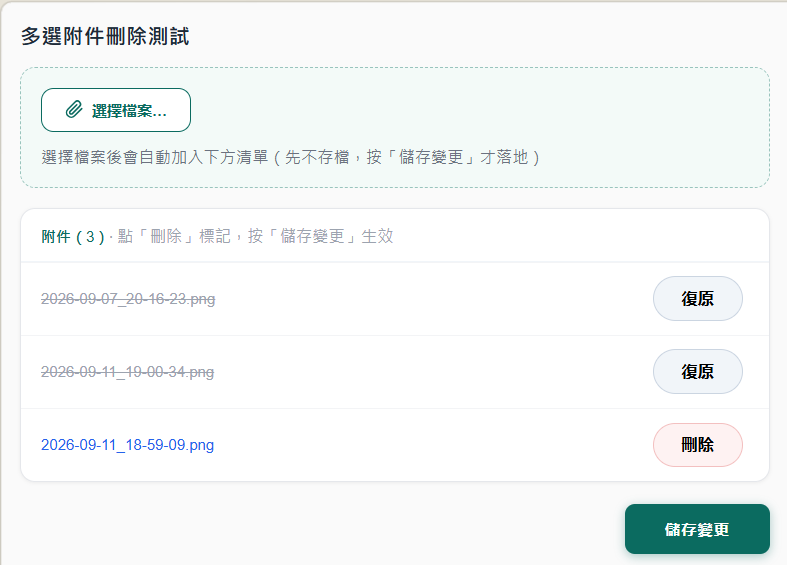
viewScope, nothing deletes on the spot: clicking “Delete” just marks the filename (the row strikes through and offers “Undo”) — nothing touches disk until you hit “Save.” That’s how the native save-bounded behavior carries over to multi-select. - Uploads ride the same save: the file chosen in
xp:fileUploadis applied todoc.Bodyduring the submit’s Update Model phase, so that onedoc.save()persists the new upload along with the deletions. - Clear the upload control after each upload: if you don’t reset
fileUpload’s value after it uploads, the next submit re-attaches the same file and Domino renames the duplicate-2— a trap we actually hit and spent a while chasing. Clearing the file input’svaluein the upload’sonComplete(a little client JS) fixes it.
Built as a minimal XPage, this runs on a test database (Domino 12.0.2). Here’s the result — two marked (struck through, buttons now read “Undo”), one left normal; nothing is actually deleted until “Save changes”:
The full source of this minimal XPage is on GitHub (Apache-2.0): bryanHsiao/domino-xpages-multi-attachment-delete — clone it and drop it into a test database.
Two things to know
- No undo: once “Save” lands the
removeAttachment, the attachment is really gone (recoverable only from a replica/backup). So “mark now, reversible until you save” isn’t just cosmetic — it’s a real chance for the user to change their mind. - Deleting by name is actually safe: you might worry a name-based delete is risky if two files share a name — but a document won’t hold two attachments with the identical filename. Domino uniquifies duplicates on upload, renaming them
foo-2,foo-3(the same mechanism behind the duplicate-2trap noted earlier), so filenames are already unique and deleting by name won’t hit the wrong file.
Wrap-up
The native XPages attachment delete is actually not bad — save-bounded and well-behaved — it just deletes one at a time. The missing “check several, delete at once” isn’t shipped by HCL and is almost absent from the community, but adding it isn’t hard: the data-source-layer removeAttachment (save-bounded too) plus getAttachmentList, an xp:repeat with a mark, and one save button — and you get multi-select batch delete without breaking the save boundary or manufacturing save conflicts.
That closes the attachments series: from multi-file upload and delete-by-criteria in LotusScript, to the classic-web %%Detach checkbox delete, to this XPages “HCL didn’t ship it, so build it” multi-select. Three stacks, one principle: deletion follows the user’s save.