Why Your Domino View Header Is Forever Off by One Column: Passthrough-HTML Black Magic
You inherit a twenty-year-old Domino application. Open one of its views in the browser — the old ?OpenView classic-web kind — and the column headers are subtly wrong: every heading sits one cell to the right of the data it labels. It’s been that way for years; the last three people to touch it shrugged and moved on. Nobody knows why, and nobody wants to be the one who “fixes” it and breaks something.
The cause is a passthrough-HTML trick that isn’t in any manual, and once you can see it, the off-by-one header is obvious. This is a field report on the black magic old classic-web views are doing — tested on Domino 12.x with Chrome/Edge, classic ?OpenView rendering (none of this applies to XPages or the REST API, which render views completely differently). All examples use a de-identified myview.nsf / VwDemo.
TL;DR
- Domino outputs
[...]in a view column value or column title formula as raw HTML — that’s passthrough HTML. It’s how classic views inject checkboxes, colours, and layout with no template. - Common uses: a spacer column whose entire value is
"[<td></td>]", a per-row checkbox built from$$SelectDoc, and a select-all checkbox in a column title. - The trick that breaks headers: an old checkbox column leaves the
valueattribute’s quote unclosed (and the tag’s>missing with it). The browser’s tokenizer then enters the double-quoted attribute-value state, where a>is just an ordinary character — so it swallows Domino’s own</td><td>cell boundary,>and all, and doesn’t stop until the next", over in the following column. Two columns collapse into one cell. - The side effect: the header row still emits one
<td>per column, so it now has one cell more than the merged data rows — and every header from the merge point on shifts one column right. That’s your “header off by one.” - Diagnosing it: data-row cell count ≠ header cell count almost always means passthrough is at work; junk attributes in DevTools like
2"=""orface="新細明體"are the swallowed remains of the next column.
Passthrough HTML, the foundation
In a classic web view, Domino renders each column into an HTML table cell. If a column’s value formula produces text wrapped in square brackets, Domino emits the bracket contents as literal HTML instead of escaping it. The same is true for a column’s static title. That one behaviour is the engine behind every trick below.
Three you’ll see constantly:
Spacer column (whole column value): "[<td></td>]"Per-row checkbox (column value): "[<input type=\"checkbox\" name=\"$$SelectDoc\" value=\"" + @Text(@DocumentUniqueID) + "\">]"Select-all checkbox (column TITLE): [<input type="checkbox" name="AllCheck" onclick="SCheck()">]The spacer column injects an empty <td> to nudge spacing. The per-row checkbox uses the special $$SelectDoc field name so classic Domino wires it into document selection. The select-all lives in the column title so it renders once in the header. All three are legitimate, documented passthrough. The trouble starts when passthrough is used to do something the parser wasn’t meant to allow.
The unclosed quote that eats a column boundary
Here is the same checkbox column, written the old way — look closely at the very end:
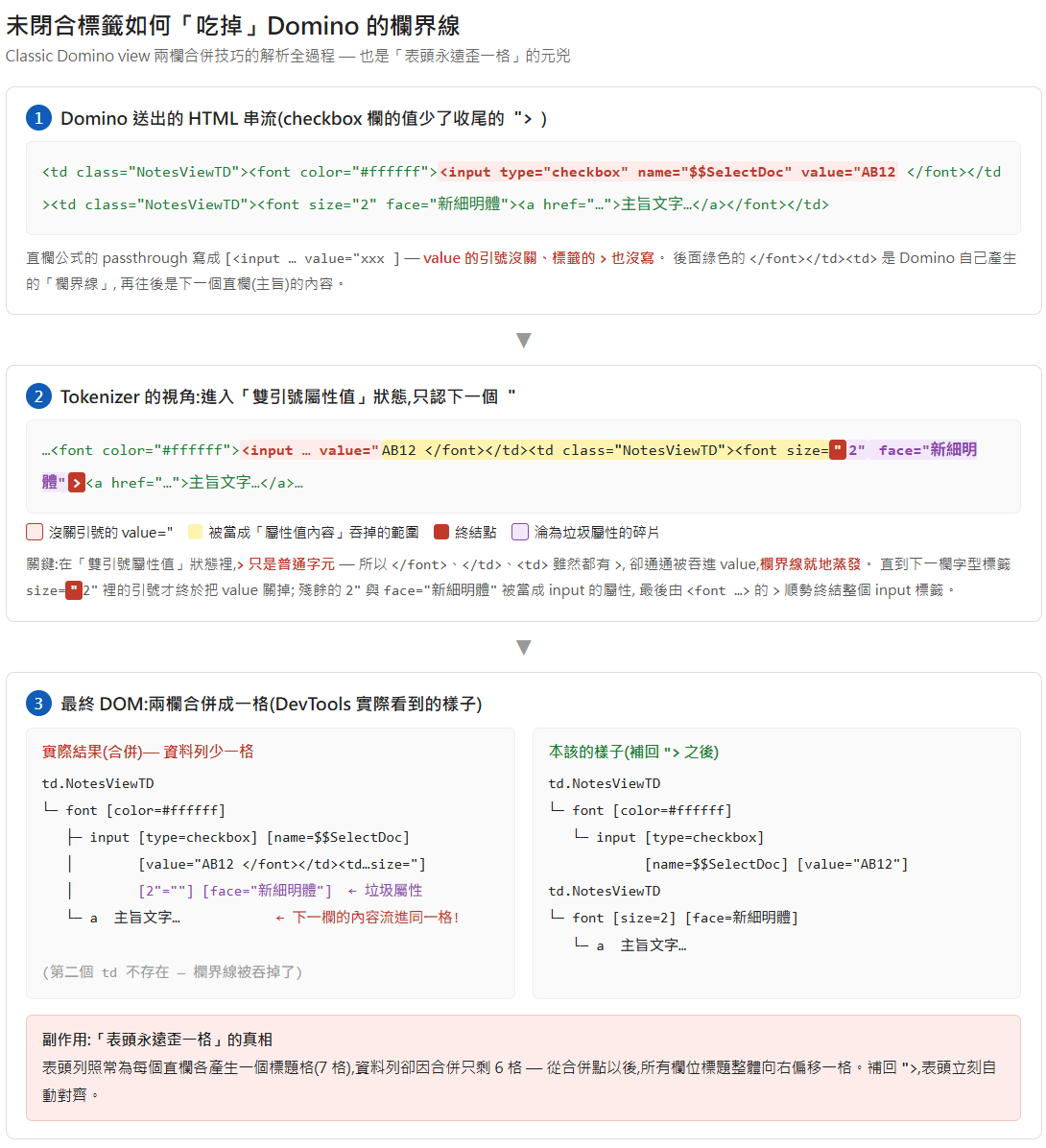
Old "merged" version: "[<input type=\"checkbox\" name=\"$$SelectDoc\" value=\"" + @Text(@DocumentUniqueID) + "]"Fixed "independent" version: "[<input type=\"checkbox\" name=\"$$SelectDoc\" value=\"" + @Text(@DocumentUniqueID) + "\">]"The old version never closes the value attribute’s quote — and so never closes the tag either. The fix adds the missing ">. That single quote is load-bearing, and the reason is subtler than “the tag isn’t closed.” Domino wraps each column value in a <font> and emits its own cell boundaries, so the rendered markup for the checkbox cell and the next (subject) cell looks like this:
<td><font ...><input type="checkbox" name="$$SelectDoc" value="ABC123</font></td><td><font size="2" face="新細明體">Subject text</font></td>The value=" opened a quoted attribute value that never got its closing ". So the browser’s tokenizer is now in the double-quoted attribute-value state, and the crucial fact about that state is that a > is just an ordinary character — it does not end the tag. The tokenizer keeps consuming, > and all, until it finds the next " — which is way over in the following column, in size="2". Everything in between — </font></td><td><font size= — gets pulled into the runaway attribute value, cell boundary and all.
This is the detail that’s easy to get wrong: it is not “read until the next >.” The boundary markup </font></td><td> is full of > characters, and they’re eaten anyway — precisely because inside a quoted value a > is inert. The value ends at a ", never at a >.
What’s left after size=" closes the runaway value — 2" face="新細明體"> — the tokenizer parses as junk attributes on the <input>: 2" becomes an attribute (the 2"="" you see in DevTools), face="新細明體" becomes another, and the input tag finally closes at the > of that <font>. Open DevTools on such a page and there it is: an <input> carrying 2"="" and face="新細明體". Those junk attributes are the fingerprint of an unclosed value quote upstream.
The visible result: the checkbox and the subject end up in the same cell, because the </td><td> boundary between them was eaten. Two columns rendered as one.
Why the header ends up off by one
Now the off-by-one falls out for free. The header row is generated separately — Domino emits one <td> per column for the titles, and none of those title cells carries a runaway quote. So the header row has its full, correct number of cells, while every data row is short by one (two columns merged into one). From the merge point rightward, each heading now sits above the next column’s data. The header isn’t “misaligned” by some CSS bug — it has literally one more cell than the rows it’s labelling.
That asymmetry is also the fix. Close the value quote and the tag — the "> in the “independent” version above — and the two columns separate again; the data rows regain their missing cell, and the headers line up on their own — no CSS change needed. The one caution: some old pages have JavaScript that depends on the merged structure (walking sibling cells by index), so check any selection or row-highlight script before you close the tag.
A diagnosis checklist
When a classic view looks structurally wrong, run down this list:
- Count the cells. Data-row
<td>count ≠ header-row<td>count → passthrough is merging or injecting cells somewhere. This single check catches most of it. - Look for junk attributes. In DevTools, an element carrying attributes like
2"="",face="...", or a stray</tdfragment means an unclosed attribute-value quote upstream ate the next column’s markup. - Know what’s structural vs stateful. A category row’s cell has a real
colspan; that’s structural. But classes likeTR0_Out/TR1_Outare swapped in by mouse-event JavaScript for row state — they’re not a fixed row type, so don’t write CSS selectors that assume they are.
Scope and caveats
This is classic-web (?OpenView) territory. XPages and the Domino REST API build their markup entirely differently and none of this passthrough behaviour — or its failure mode — applies there. The parser behaviour itself is browser-standard (a quoted attribute value swallowing everything — > included — until the next " is how HTML tokenisation works), so it reproduces in any modern browser; the tests here were on Chrome/Edge against Domino 12.x. If you’re maintaining one of these old views, the off-by-one header is almost never worth living with once you know it’s a missing > — but read the page’s JavaScript before you add it back.