domino-container-lp-recipe — A Community Tool for Adding the Traditional Chinese Language Pack to HCL Domino Container (with templates for additional languages)
TL;DR
- The official
HCL-TECH-SOFTWARE/domino-containerships with 6 Language Packs (DE / ES / FR / IT / NL / JA) - Upstream Issue #55 discussed how to install other LPs; the maintainer’s position is that adding more LPs to
build.shwould mean owning maintenance for every language — a reasonable engineering call - The community tool
bryanHsiao/domino-container-lp-recipeonly ships Traditional Chinese (TC) as a verified, end-to-end build: a small script that applies ~50 lines of patches to a clean upstream clone (not maintaining a fork), then./build.sh ... -domlp=TCproduces an image with the TC LP baked in - SC and KO are not supported — they are templates in
language_registry.pyfor the community to extend. SC is inferred symmetrically from TC and requires the--allow-inferredflag (not tested in practice); KO is an empty skeleton waiting for someone to fill in the installer code. They exist as reference entries to give people with those language needs a starting point; if you get them working, please PR back to promote the status - ⚠️ Important caveat: rebuilding the image on an already-running server does not retroactively translate existing
.nsffiles — Domino’s entrypoint detects “Data already installed” and skips template deployment. There’s a section below specifically on this — read it before rebuilding production
Background: upstream’s position on Issue #55
In November 2022, someone opened Issue #55 on the upstream repo asking how to install LPs. Daniel Nashed (the upstream maintainer) replied with workarounds — stop the container, spin up a temporary one, run LNXDomLPxx silent install — and in follow-up discussion made the maintenance scope explicit:
“The right way would be to add it to the software file, but then we would need to support all the languages…”
In other words: actually wiring new LPs into build.sh would mean owning “all languages, all versions” as ongoing maintenance. For a personally-maintained open-source repo, that’s a reasonable engineering call.
But the need for LPs outside the original 6 doesn’t disappear — anyone deploying Domino in Taiwan, mainland China, or Korea typically wants TC / SC / KO, and ends up hand-rolling the integration themselves. domino-container-lp-recipe standardizes the Traditional Chinese hack into a shared, repeatable, tested tool, and leaves the extension pattern in language_registry.py (with SC / KO entries as reference templates) so people with other language needs have a starting point to extend and contribute back.
The three-layer LP integration — why each language touches ~7 spots across 3 files
Adding a new LP to build.sh isn’t just “add a menu item.” Distilled from how-it-works.md:
| Layer | File | Why it needs editing |
|---|---|---|
| UI / menu | build.sh | The LP submenu needs to list the new language so users can select it |
| Install logic | dockerfiles/install_dir_domino/install_domino.sh | Map the short code (TC) to the LP installer’s internal code (zh-TW) |
| Manifest | software/software.txt + dockerfiles/install_dir_common/software.txt | Tell build.sh “this lang/version corresponds to which LP tar file” |
All three layers are mandatory:
- Skip the manifest →
Download for [domlp] [XX-VER] not found! - Skip the install_domino.sh mapping →
Cannot find LPLog.txt - Skip build.sh → the LP menu won’t show the new language at all
Actual patch scope: build.sh 4 spots, install_domino.sh 1 spot, two software.txt files 1 spot each = 7 spots across 4 files, about 50 lines. Each new language needs the same pattern applied.
Why a Recipe and not a Fork
To “add something to an upstream repo,” there are three technical paths:
| Approach | What it is |
|---|---|
| Fork | Maintain a mirror, commit patches on top |
| Recipe (this tool) | A small script that patches a fresh upstream clone on demand |
| Patch series | git format-patch files applied via git am |
Why I picked Recipe (full reasoning in docs/why-recipe-not-fork.md):
- The change is small — ~50 lines across 4 files. Maintaining a fork that’s 99% upstream code means 95% of the maintainer’s time is just rebase noise
- Upstream moves fast — Daniel Nashed pushes directly to main, commits frequently. A fork is forever chasing
- Separating “what we change” from “the rest of the codebase” — Recipe makes the changes auditable and isolated
If upstream touches the lines I patch, the script fails loudly:
Error: expected 2 matches in build.sh, found 0Follow upgrade-guide.md to adjust the anchor string in patch.py — a small edit, not a fork-wide rebase. No long-running fork drift.
Comparison (excerpt):
| Aspect | Fork | Recipe |
|---|---|---|
| First-time use | clone fork && build | clone recipe && apply && build |
| Upstream changes file I don’t patch | rebase noise | nothing |
| Upstream changes file I do patch | rebase + per-file merge conflict | update 1 anchor string |
| Repo size | inherits 600+ upstream commits | ~300 lines of code + docs |
| Maintainer busy for 3 months | fork silently drifts | recipe pinned to last tested commit, users get a warning |
For “upstream moves fast, change is small” — Recipe is the right abstraction.
Quickstart (TC, verified)
# 1. Clone this recipegit clone https://github.com/bryanHsiao/domino-container-lp-recipe.git ~/lp-recipe
# 2. Run apply-lp.sh#    Auto-clones upstream domino-container, checks out the tested commit, patches it for TC~/lp-recipe/apply-lp.sh --lang TC
# 3. Place the LP tar in /local/software/#    (Download from HCL FlexNet; HCL software isn't redistributable, so it's not bundled here)
# 4. Buildcd /local/github/domino-container./build.sh domino 14.5.1 -restapi=1.1.7 -leap=1.1.10 -domlp=TC
# 5. Verify~/lp-recipe/verify.sh --lang TC
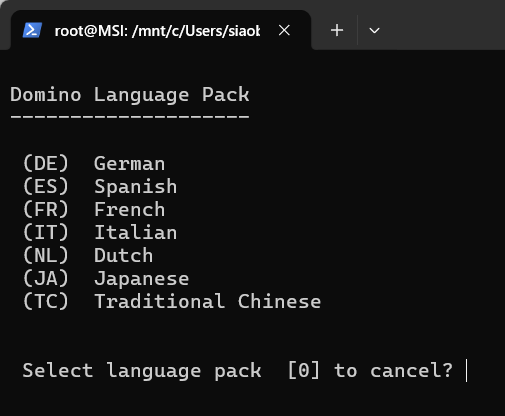
After this, re-launching ./build.sh menu and pressing L shows (TC) Traditional Chinese as a 7th option alongside the original six — press t to select:
Currently verified combinations (from tested-against.md):
| Recipe ver | Upstream commit | Domino | Lang | OS | Container engine | Result |
|---|---|---|---|---|---|---|
| v0.1 | 4734801 | 14.5.1 | TC | Ubuntu 24.04.4 (WSL2) | Docker 29.4.3 | ✅ Build + fresh setup verified — names.nsf shows 「網域監督」 |
Adding a new language (KO / SC / TH / etc.)
Full walkthrough at docs/adding-new-language.md. Three steps:
# 1. Extract the LP tar, find the installer's internal codetar -xf NotesDomLP-14050100-XX.tarstrings LNXDomLP | grep LangCodeList   # KO is "ko", for example
# 2. Add an entry to language_registry.py# Language("KO", "Korean", "k", "ko", status="verified")
# 3. Apply + build./apply-lp.sh --lang KO./build.sh domino 14.5.1 -domlp=KO
Once it works, please send a PR back here promoting the language status from template / inferred to verified — others don’t have to redo your work.
⚠️ Important caveat: the “Data already installed” sync trap
Read this before rebuilding the image on a server that’s already running.
Full discussion in docs/sync-trap-caveat.md. Summary:
Symptom
You successfully:
- Ran the recipe to integrate TC (or another LP)
- Rebuilt the image with
./build.sh ... -domlp=TC - Confirmed the image contains TC resources (
verify.sh --lang TCpasses) - Restarted the production container with the new image
…but logging into the Notes client against the server the UI is still English:
names.nsfPeople / Groups / Configuration views — English- Existing
mail/*.nsffiles — English - A newly created
testmail.nsffrom the server template — also English
Root cause
Domino container’s entrypoint checks /local/notesdata at startup. If it finds an existing installation, it skips template deployment:
Data already installed for 14050100In other words: the image has the Traditional Chinese templates, but the entrypoint won’t deploy them onto an existing notesdata directory.
Fixes (pick one)
- Fresh data dir + new OneTouch Setup — wipe
/local/notesdata, restart the container, let the entrypoint run template deployment - Manual Replace Design on every existing
.nsf—load convert -u <dbpath> * <template>, applied per database
Both need planning. This isn’t “swap image, restart, done.”
Contributions welcome + closing
This tool is for community folks who need an LP and want to extend it themselves. Routing by what’s actually delivered today:
- Need Traditional Chinese — clone the repo, run
apply-lp.sh --lang TC. This is the end-to-end verified path - Want to try Simplified Chinese — the SC entry exists in the registry (inferred symmetrically from TC as
zh-CN), use the--allow-inferredflag. Treat your own end-to-end build as the source of truth. If it works, PR back to promote the status frominferredtoverified - Want to try Korean — KO is an empty skeleton. Extract the LP tar, run
strings LNXDomLP | grep LangCodeListto find the installer code, fill it into the registry. Walkthrough inadding-new-language.md - Need to add a brand new language (TH / VI / etc.) — same
adding-new-language.mdflow, PR the registry entry - Spot upstream changing a file we patch and the recipe breaks — file an issue
Repo is Apache-2.0, same as upstream. This tool contains no HCL software — bring your own LP tars from HCL FlexNet under your own license.
The community that needs Traditional Chinese (and other LPs) for Domino deployment has always existed — standardizing the TC hack into something tested, shared, and with the caveats spelled out, plus leaving extension templates for other languages, is what domino-container-lp-recipe is for. Verified status for SC / KO and others accumulates only when community contributors plug actual LP tars in and PR back.