
After runOnServer in XPages the Document Is Still Stale — the Fix, and Using the contextDocument Instead of a Temp Doc
There’s a common XPages pattern: you need some logic to run on the server — talk to Oracle/SQL, act with the signer’s rights, or just crunch something heavy — so you write a backend agent and call it from SSJS with agent.runOnServer(noteid). You create a temp document, fill in the parameters, save it, and pass its note id to the agent; the agent processes server-side, writes the results back into that document, and saves it.
Then you read that document back for the results — and you get the values from before the agent ran. You look in the database and the document is clearly updated and saved by the agent; but your code just won’t see the new values.
It’s not a bug — it’s the nature of the document object you’re holding: it’s an in-memory snapshot taken when you loaded it, and it doesn’t update just because someone else (the agent) changed it on disk. This piece covers the pattern, why you read stale values, the standard fix, and finally a cleaner approach — use the form’s document data source (what you might call the contextDocument) as the parameter carrier, and skip the temp document entirely.
TL;DR
- The pattern: create a temp doc and fill in parameters →
save(the agent reads from disk, so you must save first) →agent.runOnServer(noteid)→ the agent picks up the doc viaParameterDocID, processes, writes back, andsaves → the caller reads the results. - The trap: the document object the caller is holding is a snapshot from load time. After the agent saves the note on disk in a separate execution, your object doesn’t auto-sync, so reading its items returns the old values.
- The fix:
recycle()the stale object, thendatabase.getDocumentByID(noteid)to reload a fresh copy from disk — only then do you see the agent’s values. - A cleaner alternative: instead of a temp doc, use the document data source the form is already bound to —
document1.save(), then pass its note id to the agent. No temp doc to create or clean up. But the same read-back rule still applies: after the agent writes, that cached backend document is stale too, so re-fetch it. - The cleanest:
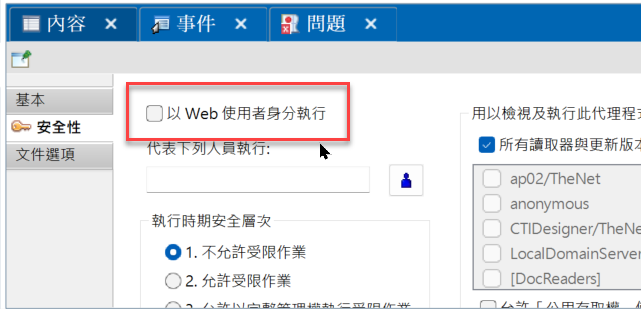
agent.runWithDocumentContext(doc)(8.5.2+) passes an in-memory document (saved or not) straight into the agent’sDocumentContext; the agent updates it in place, and when control returns you read the new values directly — no re-fetch. The hard requirement: the called agent must have “Run as Web user” selected on its Security tab. runOnServerreturns0on success — confirm that before reading results.
The pattern: a document as the agent’s “parameter mailbox”
Why go to the trouble of creating a document just to call an agent? Because runOnServer runs on the server, in a separate agent execution, and it can’t read the variables in your SSJS memory. The only thing you can hand it is a note id: agent.runOnServer(noteid) puts that id into the called agent’s ParameterDocID, and the agent then pulls the document out with getParameterDocID() (official runOnServer docs).
So the whole flow uses a document as a mailbox:
- The caller creates the doc, fills in parameters, and
saves (without a save, the agent can’t find it on disk). - Get the note id,
agent.runOnServer(noteid). - The agent does
getDocumentByID(agent.getParameterDocID())to pick up the doc, processes it (hits Oracle, etc.), writes the results back, andsaves again. - After
runOnServerreturns (0means success), the caller reads the doc for the results.
Both saves — step 1 and step 3 — are required: the agent reads the note on disk, not memory; and the caller wants what the agent wrote back to disk. The problem is at step 4.
Why you read stale values: the in-memory document is a snapshot
The key is this: the document object you hold on the caller side (whether created by db.createDocument() or fetched by getDocumentByID) is a backend document object, and it wraps an internal state that was fixed at load time.
agent.runOnServer runs in its own separate agent execution, and what it changes and saves is the note on disk. The disk changed, but your already-loaded object on the caller side doesn’t go back and reconcile with disk — it’s still holding the item values from when it loaded. So when you read tmpdoc.getItemValueString("status") after runOnServer, you get the value from “before the agent touched it.”
In other words: the agent did save — you just read the wrong thing. You read the old snapshot in memory, not the new content on disk.
The fix: recycle the stale object, getDocumentByID a fresh one
Since the stale object won’t update itself, drop it and reload:
tmpdoc.save();var noteid = tmpdoc.getNoteID();tmpdoc.recycle(); // release the stale in-memory objectif (agent.runOnServer(noteid) == 0) { // reload from disk the copy the agent changed var resultDoc = database.getDocumentByID(noteid); var nextSigner = resultDoc.getItemValueString("NextSigner"); // ...use resultDoc's fresh values... resultDoc.recycle();}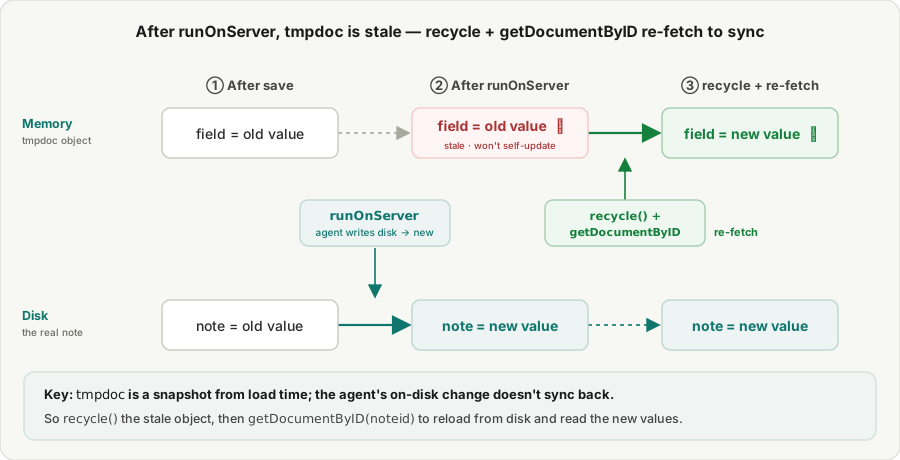
Both steps matter:
recycle()the stale object: release the internal handle it holds (at the XPages/Java layer a backend object wraps a C handle that the JVM won’t free for you, so makingrecyclea habit helps your memory too — there’s a dedicated piece on that).getDocumentByID(noteid)to reload: this is what loads a fresh object that reflects the agent’s changes.
That’s why “recycle first, then getDocumentByID” is the standard end to this pattern — it isn’t a ritual, it’s that you genuinely need a fresh object that’s been synced with disk.
Cleaner: use the contextDocument instead of a temp doc
The pattern above requires creating a separate temp document and cleaning it up afterward (otherwise your database fills with orphan documents created only to call an agent — which is why people end up adding a CreatorDelete-style flag and writing a cleanup agent).
If your button is already on an XPage bound to a document data source, you don’t need a second document — just use the one the form is editing as the mailbox. The XPages data source is a NotesXspDocument (default variable names document1, document2, …, or you might have named it contextDocument); save it with the data source’s save() and get its inner lotus.domino.Document with getDocument() (official, DominoDocument JavaDoc) to hand to the agent:
// use the form's data source, no temp docdocument1.save(); // save the data source (in a submit event the on-screen values are already in its document)var noteid = document1.getDocument().getNoteID();if (agent.runOnServer(noteid) == 0) { // read results: re-fetch, don't trust the one you're holding var fresh = database.getDocumentByID(noteid); // ...use fresh's values, or push them back into the data source and refresh...}document1.save() is deliberate here: in a normal submit event, XPages’ Update Model Values phase has already written the on-screen values into the data source’s document before the button SSJS runs, so there’s nothing extra to do. (The difference between getDocument() and getDocument(true) — and when you actually need (true) — is a topic of its own, covered in what the true in getDocument(true) actually does.)
The benefit: no temp document to create, and no orphans to clean up. But keep one rule in mind that hasn’t changed: after the agent writes back, the backend document the data source is holding is still stale — it won’t sync the agent’s on-disk changes back on its own. To show the new results, you still getDocumentByID to re-fetch, or push the new values back into the data source and refresh.
There’s also an identity detail that’s easy to miss: an agent invoked from XPages runs as the signer by default, and whether the effective user is the signer or the logged-in web user decides its ACL access (what it’s allowed to do — restricted vs unrestricted operations — is still governed by the signer; the two are separate) (official Web agents docs: check “Run as web user” and it runs under the browser login, otherwise under the signer). So if the document has Readers fields, or an ACL that would block the signer, the agent-as-signer won’t read the values you just saved — then you need “Run as Web user” on the agent’s Security tab so it reads as the authenticated user.
Cleanest: runWithDocumentContext — no save, no re-fetch
Both options above (temp doc, contextDocument) still need a save plus a getDocumentByID re-fetch afterward. Since 8.5.2 there’s a more direct call, agent.runWithDocumentContext(doc): it passes an in-memory document (saved or unsaved) straight into the called agent’s DocumentContext — the agent picks it up with session.DocumentContext (LotusScript) / getDocumentContext() (Java), processes it, and writes back; when control returns to the XPage you read the agent’s new values from that same document directly, no getDocumentByID needed (official wiki, verbatim: “when control returns to the XPage the updated values can be read from the document”).
var beDoc = document1.getDocument(); // the form's backend doc (it already has the on-screen values in a submit event); or any in-memory doc — no save neededagent.runWithDocumentContext(beDoc); // passed into the agent's DocumentContext// read beDoc directly on return, no re-fetchvar nextSigner = beDoc.getItemValueString("NextSigner");This clears both of the article’s headaches at once: no wrestling with the save, and no stale handle. But it comes with one hard requirement HCL states outright: the called agent must have “Run as Web user” selected on its Security tab, or the in-memory document context won’t work correctly (that checkbox in the screenshot is exactly this one). The server’s Security document must also permit agents/XPages to “sign to run on behalf of the invoker” for the pattern to run at all.
How to choose: need to support very old versions, or the agent is unrelated to the on-screen document (a pure server-side RPC) → temp doc / runOnServer; want to drop both the save and the stale handle, and you can set the agent to run as web user → runWithDocumentContext is cleanest.
A few practical notes
- Always
savebefore the call: the agent reads disk, so an unsaved doc isn’t found (and a new document only gets a stable note id once saved). - Check the return value:
runOnServerruns synchronously — it blocks until the agent finishes, which is why you can read the results as soon as it returns; a return of0is what tells you the agent ran and succeeded, so gate your read on that. - When a temp doc is still the right call: when you don’t want to touch or save the real document (e.g. a pure server-side RPC via the agent, unrelated to the on-screen document), a throwaway temp doc is cleaner — just give it a cleanup mechanism.
- Make
recyclea habit: for backend objects youcreateDocument/getDocumentByIDyourself in XPages SSJS, recycle them when done — it helps the long-running HTTP process’s memory.
What about LotusScript and Java?
This piece is SSJS-first, so — as usual — here’s the cross-language view; the pattern is really the same across all three:
- LotusScript (Notes client): where it all started. The stale handle is the same:
Set doc = Nothingto release,Set doc = db.GetDocumentByID(noteid)to re-fetch;RunWithDocumentContext(doc, noteid)(8.5.2+) exists in LotusScript too, and the agent reads it the same way withSet doc = session.DocumentContext; the “contextDocument” equivalent isuidoc.Document(the backend doc of the open form). Two client-only differences: (1) “Run as Web user” is a web-agent setting — on the Notes client the agent runs as the current Notes user, so that checkbox doesn’t apply; (2) to see an agent’s changes in the open UI,uidoc.Reloaddoes not pick up modifications made “outside the current editing session” (by an agent or another user) — HCL says the document must be “closed and reopened” (Reload docs) — so a backendGetDocumentByIDre-fetch is the reliable way. - Java: XPages SSJS is the Java Domino API underneath —
Agent.runOnServer(noteid),runWithDocumentContext(doc, noteid),AgentContext.getDocumentContext()are the same set; the SSJS in this piece maps almost one-to-one to Java.
Wrap-up
Reading stale values after runOnServer isn’t the agent failing to save — you’re reading the old in-memory snapshot: the caller’s document object is fixed at load time, and the agent’s on-disk changes don’t sync back. The standard fix is recycle() the stale one and getDocumentByID() a fresh one. And if you’re creating a temp document only to call an agent, you can usually use the form’s document data source (document1.save(), then pass the note id) as the mailbox instead and skip the creation and cleanup — just remember the “re-fetch to read results” rule applies the same whether you use a temp doc or the contextDocument. And to drop both the save and the re-fetch at once, use runWithDocumentContext to pass the in-memory document straight into the agent’s DocumentContext and read it back on return — provided you set that agent to Run as Web user.
Sources
- runOnServer (NotesAgent - JavaScript) (returns 0 on success; noteID is passed to ParameterDocID) — HCL Domino Designer (official)
- getDocument (NotesXspDocument - JavaScript) (getDocument(applyChanges) returns the wrapped NotesDocument) — HCL Domino Designer (official)
- DominoDocument (the Java class behind NotesXspDocument; getDocument(boolean applyChanges) returns the inner Document) — HCL/IBM JavaDocs (official)
- XPages and Calling Agents Using an In-Memory Document (runWithDocumentContext, 8.5.2+, the agent must have Run as Web user selected) — HCL Domino App Dev wiki (official)
- Web agents (Run as web user = the browser login becomes the effective user; otherwise the agent runs with the signer's rights) — HCL Domino Designer (official)