What the true in document1.getDocument(true) Actually Does
In XPages SSJS you’ve surely seen both forms: document1.getDocument(), and document1.getDocument(true). The true is applyChanges — but what changes does it actually “apply,” and when must you add it versus when is it just for peace of mind?
It’s worth getting straight, because both sides bite: omit it and you might hand off or save a document that’s missing a value you just set in code; add it and you’re copying a pattern you saw without understanding it. This piece sorts out the difference between getDocument() and getDocument(true), and when you actually need it. (The question most often comes up when handing a document to a backend agent — that scenario is in reading stale values after runOnServer; this piece is the standalone deep-dive on the getDocument(true) part of it.)
TL;DR
getDocument()(i.e.applyChangesdefaults tofalse): returns the data source’s innerlotus.domino.Documentwithout first applying pending changes.getDocument(true): first flushes the data source’s currently pending changes (control input, and anything you changed programmatically withsetValue) into that backend document, then returns it (official docs: true “applies any changes made to the data store”).- When it’s usually not needed: in a normal submit, JSF’s Update Model Values phase has already synced the bound control values into the data source before your button SSJS runs, so
getDocument()already reflects the on-screen values and(true)is mostly redundant. - When you genuinely need it: you changed the data source in code (
document1.setValue(...)) and then operate directly on the backend document (save it,generateXML(), hand to an agent) — that’s when(true)puts those changes in. - The split: just saving the whole thing →
document1.save(); reading one on-screen field’s current value →getComponent("xx").getValue().
How getDocument() and getDocument(true) differ
The XPages document data source is a NotesXspDocument (default variable names document1, …), and it wraps a real lotus.domino.Document inside. Both methods hand you that inner document; the only difference is whether it flushes pending changes in first (official getDocument, DominoDocument JavaDoc):
getDocument()/getDocument(false): returns the document as it currently is, without proactively applying changes the data source is still holding.getDocument(true): the JavaDoc puts it plainly — “Apply any changes to the wrapped document before returning it.” Flush the changes into the inner document, then return it.
So true isn’t a magic switch; it’s a flush: write the data-source-level pending changes down into the backend-document level.
Where the “changes” come from: control input + programmatic setValue
To know when you need true, you need to know what it’s flushing. Two sources:
- The user’s input in the controls. A field is bound to the data source; the user edits it, and that value goes into the data source’s model.
- Your own code.
document1.setValue("Status", "done")ordocument1.replaceItemValue(...)in SSJS also change this data-source layer.
Both kinds of change land in the data source model first, and aren’t necessarily synced into the inner lotus.domino.Document at that moment. What getDocument(true) does is push them in before it hands you the document.
When you usually don’t need true: the JSF lifecycle
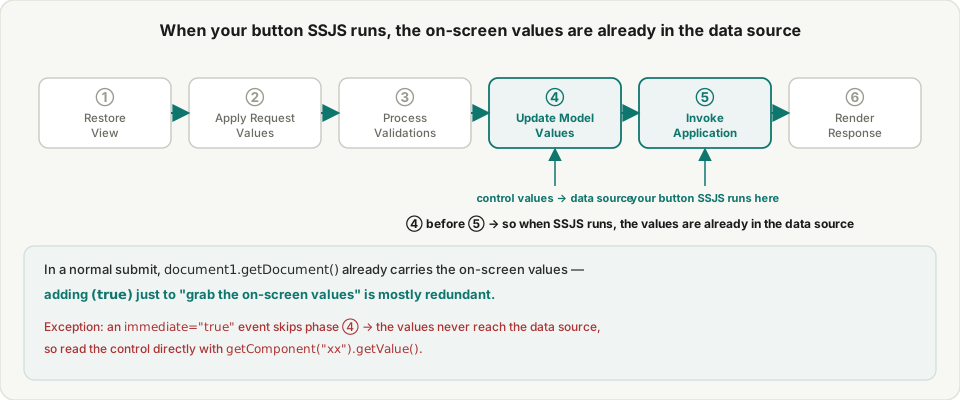
This is where true gets added by mistake most often. XPages is built on JSF, and a submit runs six phases in a fixed order:
- Restore View
- Apply Request Values
- Process Validations
- Update Model Values ← writes the controls’ values into the back-end model (your data source)
- Invoke Application ← your button SSJS runs here
- Render Response
The key is that 4 runs before 5: by the time your button event (phase 5) runs SSJS, the values the user typed into bound controls were already synced into the data source back in phase 4. So document1.getDocument() already carries the on-screen values here, and adding true just to “grab the on-screen values” is mostly redundant.
One exception to remember: an immediate="true" event (some cancel buttons, certain partial actions) skips Update Model Values — so the new on-screen values never reach the data source, and neither getDocument() nor getDocument(true) has them; you read them with getComponent("xx").getValue() straight from the control.
When you genuinely need true
Since a normal submit’s getDocument() is already enough, true earns its keep when you’ve changed the data source in SSJS and then operate directly on the backend document:
- You
document1.setValue(...)a few fields, then want togenerateXML()that document, or save a copy of it, or pass its note id to an agent — operations that touch the backend document directly. WithgetDocument()(no true), the values you just set in code aren’t necessarily in it;getDocument(true)applies them first. HCL’s own example is exactly this flavor:document1.getDocument(true).generateXML()— to output XML that includes the latest changes. - When you’re not sure the data source’s changes have reached the document and you’re about to operate on it directly,
trueis the explicit “make sure they’re in there.”
In other words: true exists for “operate on the backend document directly, and include the pending changes” — not as a ritual for every time you grab the document.
Three ways to get a value, each for one job
Boil it down to one practical split and you stop second-guessing the true:
- Just saving the whole thing →
document1.save(). That’s the data source’s save; it flushes pending changes into the document and writes it to disk — you never touchgetDocumentat all. - Operating directly on the backend document (serialize, pass to an agent, copy…) →
document1.getDocument(true). Usetrueto be sure both the programmatic changes and the on-screen values are in that document. - Just one on-screen field’s current value →
getComponent("xx").getValue(). Reads the control directly, without going through the data source — and for animmediateevent (no Update Model Values), it’s the only way to get the on-screen value.
Plenty of people keep the three cleanly apart with exactly this split (“getDocument() for the backend, getComponent().getValue() for the screen, save() for the whole thing”), and then the true stops being a puzzle.
Wrap-up
The true in document1.getDocument(true) is applyChanges: before it hands you the inner lotus.domino.Document, it flushes the data source’s pending changes (control input + programmatic setValue) into it. In a normal submit, Update Model Values has already synced the on-screen values into the data source, so getDocument() already carries them and (true) is mostly redundant; where it earns its keep is when you changed the data source in code and then operate directly on the backend document. When you’re unsure whether to add it, fall back on the split: save() to save the whole thing, getDocument(true) to operate on the document, getComponent().getValue() to read one on-screen field.
Sources
- getDocument (NotesXspDocument - JavaScript) (getDocument(applyChanges): true applies changes, false doesn't) — HCL Domino Designer (official)
- DominoDocument (getDocument(boolean applyChanges): Apply any changes to the wrapped document before returning it) — HCL/IBM JavaDocs (official)
- NotesXspDocument (the XPages document data source; getting the inner Document, getValue/replaceItemValue) — HCL/IBM Knowledge Center (official)