
partial refresh vs partial execution: the XPages JSF Lifecycle, and Why Refreshing One Area Still Recomputes the Whole Page
You click a button on an XPage to update one small area — and a validator on a completely unrelated field pops up and blocks you. Or you do a partial refresh that returns one small chunk of HTML, yet the server’s CPU acts like it recomputed the whole page.
Both have the same root: every XPages submission runs a round of the JSF lifecycle, and by default it runs for the whole page. XPages gives you two independent knobs to narrow that — but many people set only one (the client-side partial refresh) and assume the server got cheaper too. It didn’t.
This piece uses the six JSF phases to explain what partial refresh and partial execution each actually control.
TL;DR
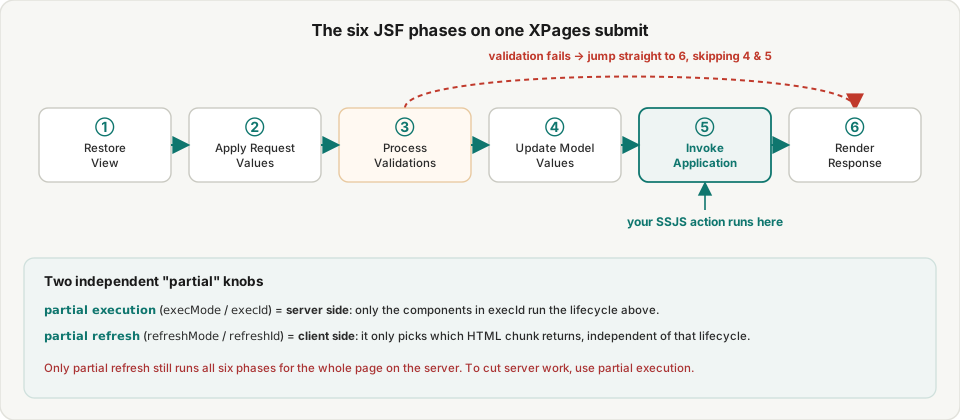
- The six JSF phases (run in order on every submit): Restore View → Apply Request Values → Process Validations → Update Model Values → Invoke Application → Render Response. Your SSJS action runs in phase 5, Invoke Application.
partial refresh(refreshMode="partial"+refreshId) = client-side: HCL defines it as “a fragment of a submitted page is refreshed rather than all controls” — it only decides which HTML comes back, and doesn’t change server processing.partial execution(execMode="partial"+execId) = server-side: HCL defines it as “the events for one control are executed rather than for all controls” — this is the knob that scopes the lifecycle to one component.- They’re independent: with partial refresh alone, the server still runs all six phases for the whole page (so unrelated validators fire, computed fields recompute). To make the server cheaper, use partial execution.
- A validation error jumps straight to phase 6 (skipping Update Model / Invoke Application) — your action never runs.
- To point
refreshId/execIdat a specific control — anything other than the event handler’s own area — set them in source.
The six JSF phases
Every XPages submit walks the component tree through six phases (see Intec’s JSF lifecycle deep-dive):
- Restore View — restore the component tree so this submission’s browser changes can be applied.
- Apply Request Values — pull browser input into each component’s
submittedValue. This is where execMode bites: full pulls everything; partial pulls only what’s insideexecId. - Process Validations — run converters/validators. Any validation failure jumps the lifecycle straight to phase 6, Render Response, skipping the model update and application logic entirely.
- Update Model Values — validated values get written back to the datasource (moving from
submittedValuetovalue). - Invoke Application — your SSJS action runs here, working on the validated values.
- Render Response — produce the HTML to return; a partial refresh returns only the
refreshIdfragment at this phase.
Read that and the “unrelated field blocks me” bug is obvious: by default the whole page enters phase 3, so other fields’ validators run too.
partial refresh: just less HTML from the client
partial refresh is the event handler’s refreshMode="partial" + refreshId. HCL’s refreshMode definition:
Partial refresh means that a fragment of a submitted page is refreshed rather than all controls on the page.
The key point: it only governs “which HTML comes back in phase 6.” Phases 1–5 — every validation, every computed recalculation — still run for the whole page. As Paul Withers puts it, refreshId has no effect on server processing; whatever you put there, the whole XPage is recomputed in the lifecycle. So partial refresh alone saves you network payload, not server CPU.
partial execution: scope the server lifecycle to one area
To make the server process one area only, use partial execution — the event handler’s execMode="partial" + execId. HCL’s execMode:
Partial execution means that the events for one control are executed rather than for all controls on the page.
With it set, phases 2–5 run only for the components inside execId: outside that area, nothing is pulled, validated, or recomputed. That’s the real fix for “an unrelated field’s validator blocks me” — that field never enters the lifecycle.
The tradeoff: values outside execId that the user typed but hasn’t submitted revert to their last-refreshed state (they weren’t applied this pass). So scope execId to cover exactly the inputs this action needs.
Two knobs, used independently
refreshId (client return) and execId (server processing) are two separate things that don’t affect each other:
refreshIdonly: less HTML, but the server recomputes the whole page — validations and computeds all run.execIdonly: the server computes one area, but may return the whole page’s HTML.- Both set: the server computes one area and the client swaps one area — you save both computation and payload. That’s the complete way to write “one button touches one small area.”
What about LotusScript and Java?
The six JSF phases are an XPages runtime thing, with no LotusScript / Java-agent counterpart:
- LotusScript / Java agent: a “run a program start to finish” model — no component tree, no phased apply/validate/render; you write validation yourself.
- SSJS: not a parallel world — your SSJS runs in phase 5 of this very lifecycle. Understanding the phases is what explains why your action receives already-validated values, and why some things need viewScope to survive across phases (see the four XPages scopes).