
Domino Web View Paging: Start Isn't a Row Number, It's a Hierarchical Coordinate
I wanted a simple thing: a custom pager on a classic Domino web view where the row numbers continue across pages — page 2 starts at 31, page 3 at 61, and so on. So I did the obvious thing and computed offset = Start - 1 from the URL. Then I loaded ?OpenView&Start=31 and got a blank page. No documents found. The view has thousands of documents.
That blank page was the start of a small education. Start in a categorized classic view is not a row number — it’s a hierarchical coordinate, and once you see that, a whole class of “why is my pager broken” bugs makes sense. This is that field report (tested on Domino 12.x, classic ?OpenView; XPages and the REST API page views differently and none of this applies there). Examples use a de-identified myview.nsf.
TL;DR
- In a categorized view, a plain
Start=2jumps to the 2nd top-level category, not the 2nd row.Start=31when there are fewer than 31 top-level categories returnsNo documents found. - Dotted values like
Start=1.1.1.1.6are hierarchical coordinates: each segment is “which sibling at this level,” and the last segment is the position within that category. It’s the same coordinate system asNotesViewEntry.Positionand?ReadViewEntries. - The last segment clamps; middle segments don’t.
Start=1.1.1.1.59999snaps to the end of that branch;Start=2.99999.1returnsNo documents found. - You can’t jump to the absolute last page with one URL. Native
ViewNextPage/ViewPreviousPagework only because Domino computes the next coordinate for you (and the native “next page” overlaps one row — the previous page’s last row becomes the next page’s first). - Three uses fall out of this: a free in-category serial from the Start segment, the
@DocNumberfamily in a column formula (with a sharp must-be-used-alone landmine), and breadcrumbs by reverse-looking-up ancestor coordinates via?ReadViewEntries.
The behaviour, measured
Rather than trust intuition, here’s what each URL actually does against a categorized view:
| URL | Result |
|---|---|
Start=2 (plain number) | Jumps to the 2nd top-level category — not the 2nd row |
Start=31&ExpandView | Fewer than 31 top-level categories → No documents found |
Start=1.1.1.1.6 | Starts at the 6th document in that category (what the native “next page” produces) |
Start=1.1.1.1.59999 (last segment out of range) | Clamped to the end of that branch |
Start=2.99999.1 (middle segment out of range) | No documents found (middle segments do not clamp) |
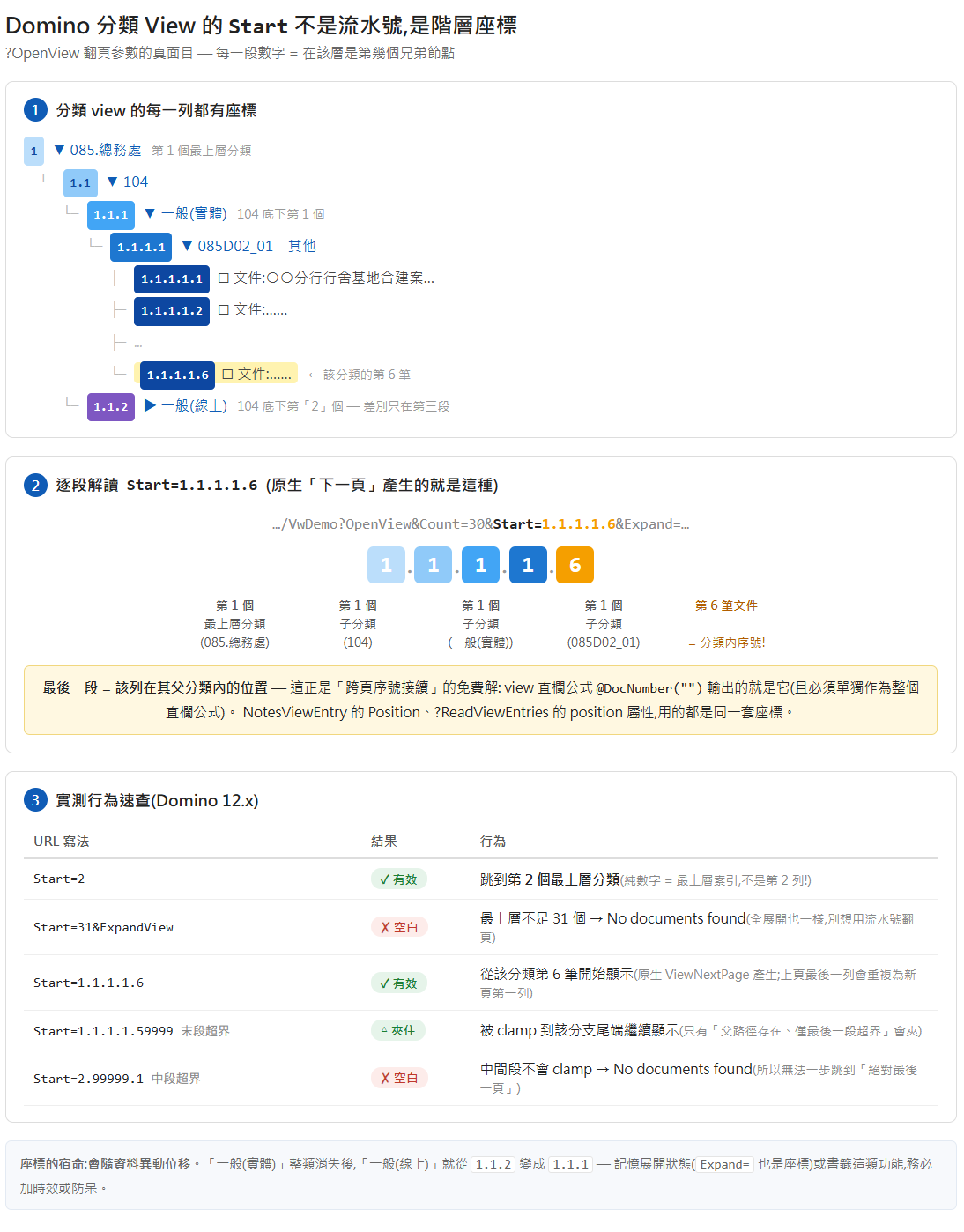
Read the dotted form as a tree path. 1.1.1.1.6 means: 1st top-level category → its 1st sub-category → its 1st → its 1st → the 6th document under that. Every segment answers “which sibling here,” and the trailing segment is the document’s index inside its immediate category. This is exactly the coordinate you see as NotesViewEntry.Position in LotusScript/Java, and as the position in a ?ReadViewEntries response.
Two consequences worth internalising. First, the last-segment-clamps-but-middle-doesn’t rule means you can safely overshoot within a category (handy for “last page of this category”) but not across the tree. Second — and this is the one that kills naive pagers — there is no single URL that jumps to the absolute last page, because you’d have to already know the full coordinate of the last leaf. The built-in ViewNextPage / ViewPreviousPage @DbCommands work precisely because Domino walks the tree and computes the coordinate for you. (A quirk of those built-ins: the “next page” reuses the previous page’s last row as the new page’s first row — a deliberate one-row overlap.)
Use 1: a free in-category serial number
Because the Start coordinate’s last segment is the position within the category, you can derive a running number with zero extra requests. Read Start from location.search, take its last segment as the starting number for the first row on the page, and reset to 1 whenever you cross a category row while walking down. You get per-category numbering that stays correct across pages — for free, no server round-trip. It works, but the next option is cleaner if you can add a column.
Use 2: the @DocNumber family — and its landmine
If you can edit the view design, @DocNumber hands you the coordinate directly in a column:
| Formula | Output |
|---|---|
@DocNumber | 1.1.1.1.5 (the full coordinate) |
@DocNumber("") | 5 — “the least significant item of the document number… its rightmost component” (= the in-category serial) |
@DocNumber(":") | 1:1:1:1:5 (custom separator) |
@DocNumber("") is the clean way to get “position within category.” But here is the landmine, and it’s a good one: @DocNumber must be the entire column formula. The docs say it plainly — “this function does not work in any other formula,” and “you cannot use this function in Web applications, except in column formulas.” @DocNumber (and its relatives @DocChildren, @DocDescendants, @DocParentNumber) are render-time special tokens, evaluated by the view indexer, not values in the normal formula sense. So a formula like:
@Subset(@Explode(@Text(@DocNumber); "."); -1)— trying to “grab the last segment yourself” — does not error and does not work. It compiles, it runs, and the column still shows the full 1.1.1.1.5, because @DocNumber never became a string for @Explode to split. To get just the last segment, use the built-in @DocNumber(""). (And note @Position doesn’t exist in the formula language at all — that’s the LotusScript/Java NotesViewEntry world.)
Use 3: breadcrumbs by reverse-lookup
The coordinate is also a key you can query. ?ReadViewEntries&Start=1.1.1&Count=1 returns exactly that one node, and its category name is in the <text> element of the response. So when a user pages into the middle of a big categorized view and loses all sense of where they are, you can rebuild the context: take the Start coordinate, walk its ancestor paths (1, then 1.1, then 1.1.1, …), look each one up, and assemble a breadcrumb like 085 › General Affairs › 104 › … (continued) above the table.
var m = location.search.match(/[?&]Start=([\d.]+)/i);if (m && m[1].indexOf('.') > 0) { var segs = m[1].split('.'); for (var i = 1; i < segs.length; i++) { var pos = segs.slice(0, i).join('.'); // ?ReadViewEntries&Start=<pos>&Count=1 → read the <text> node = that level's category name }}Two gotchas here: ?ReadViewEntries treats a plain-number Start the same way (top-level categories only), so build the dotted ancestor paths explicitly; and Count has a server-side ceiling (around 1000), so don’t try to pull an entire large view in one request.
One last caveat: coordinates move
A coordinate is a position, not an identity — insert or delete documents and every coordinate after the change shifts. So Start values are perfect for “next page from here, right now,” but a poor choice for anything you persist. If you’re building a “remember where I was” feature from Start, add a staleness guard (a timestamp, or a re-anchor to a document UNID) rather than trusting a stored coordinate to still point at the same row later.
What about Java and SSJS?
The Start/@DocNumber mechanics are classic-web and formula-language features with no direct XPages or REST equivalent — those stacks page views their own way. What does carry across is the coordinate system itself: the dotted position you see in a Start URL is the same value exposed as NotesViewEntry.Position in LotusScript and Java (and via getPosition() in SSJS). If you’re computing hierarchy positions on the back end rather than the URL, that’s the property to reach for — same coordinates, different door.