
XPages: Documents Don't Show When a Multi-Column Category's Next Column Is Also a Category — the 12.0.2 Regression
You have an XPages view categorized on multiple columns. You apply a filter, and where the filtered-to next column is still a category (not yet the document level) — the screen shows the category name, but the documents under it are gone. The same design works on 12.0.1; move to 12.0.2 and it breaks.
This isn’t a bug in your code — it’s an HCL-acknowledged regression. There’s a notes.ini workaround, but it’s the kind that “turns off an internal behavior,” so it’s worth knowing what it turns off and what the real fix is before you let it live in notes.ini.
TL;DR
- Symptom (official KB0102504): with an XPages view categorized on multiple columns, when a filter lands where the next column is also a category, “12.0.2 shows the category but not the document” — the category appears, the document doesn’t; 12.0.1 works.
- Cause: a regression — HCL’s words, “a regression caused by another issue (SPR# PJONB7GRUL) that was fixed in 12.0.2”; the regression itself is SPR# MNIACMGKUV.
- Workaround: add
DISABLE_REFIND_IN_READENTRIES=1to the servernotes.ini(restart) — HCL says it will “restore the normal behavior before the fix.” - Real fix: upgrade to 12.0.2 FP3 or 14.0 (HCL’s Resolved version). Remove the setting after upgrading.
- Caveat: the setting isn’t guaranteed for every look-alike — FoCul tested it on a Nomad Web 1.07 categorized-view problem and it “did not work.” Confirm your symptom and version first.
The symptom: category within category, and the document vanishes
KB0102504 describes the scenario concretely: in the same view, both documents show with no filters; filter by field1b and field2b;
- 12.0.1: shows the category and the document correctly.
- 12.0.2: shows the category but not the document.
The key condition is “the next column is also a category” — i.e. your view is multi-level categorized, and after filtering you’re sitting on a category level that has another category below it. That “category within a category” nesting is exactly where the 12.0.2 regression lands.
Why: fix one bug, add a refind
An XPages view builds its display by reading view entries underneath (the same view-entry read mechanism as classic web’s ?ReadViewEntries). A categorized view’s entries include both category rows and document rows, so positioning under nested categories is already fiddly.
When HCL fixed another bug in 12.0.2 (SPR# PJONB7GRUL), the ReadEntries read path gained a “refind” (re-position) step. It’s harmless in the general case, but under “category within a category, reaching down to the document” it drops the document — becoming a new regression (SPR# MNIACMGKUV). The setting name is literal: DISABLE_REFIND_IN_READENTRIES turns off that refind in ReadEntries, back to the behavior before the step was added.
How it shows up in practice: one \ turns a view into nested categories
This bug is often hit by accident — not because the rule is obscure. In a column flagged “Categorized”, a \ (backslash) in the value is Domino’s sub-category separator; any seasoned Notes developer knows this, and the docs put it plainly: “A backslash ( \ ) after a main entry denotes the subcategory name.” What actually trips people up is forgetting it while stringing a column formula together. (Put the same value in a merely sorted column and it displays as the literal text ABC\File; flag that column Categorized and the identical value splits into levels.) So a column formula that looks like it just concatenates two fields —
DocNo + "\\" + FieldCode— does not produce a flat string ABC\File; Notes splits it into two category levels: DocNo (level 1) → FieldCode (level 2, e.g. File, AssetReport). The view has quietly gone from “single categorized column” to “nested categories” — landing right on this bug’s trigger condition.
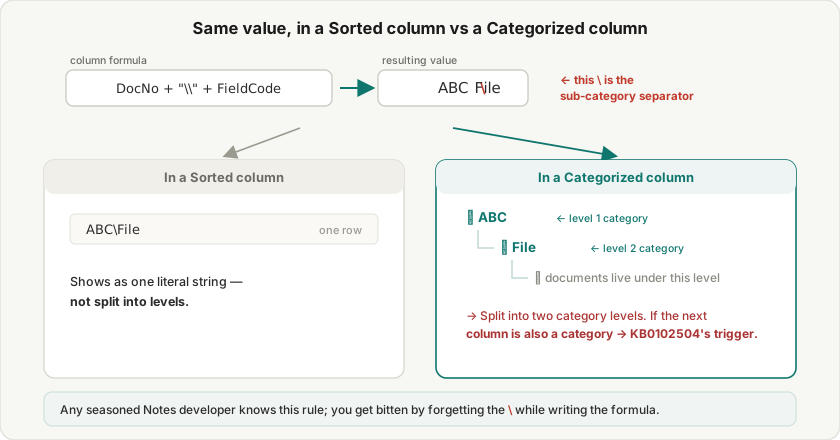
A real case: someone stored each attachment as its own document keyed by the record number, displayed them through a categorized view (column formula exactly the DocNo + "\\" + FieldCode above), and set the XPages category filter to FormNumber + "\\File" — i.e. filtering into the ABC\File nested category. After the DB moved to R12 (12.0.2), only the first file under a category ever showed; delete it and the next appeared — exactly the refind positioning symptom above.
The fix in that case was to drop the \\ (stop using it to create a second category level); the view went back to a single level, the trigger condition was gone, and it worked. That’s the “de-nest” workaround — the same destination as DISABLE_REFIND_IN_READENTRIES=1 (disable the refind) by a different road, with the real fix still being 12.0.2 FP3 / 14.0.
A useful check: if you didn’t intend a multi-level category but hit this symptom, look back at the categorized column formula for a stray \ — it may be quietly turning your view into nested categories.
Workaround and real fix
Workaround — add to the server notes.ini (then restart Domino):
DISABLE_REFIND_IN_READENTRIES=1HCL states it will “restore the normal behavior before the fix” — turning off the refind that drops the document, back to the pre-PJONB7GRUL behavior.
But it’s a stopgap. KB0102504’s Resolved version is 12.0.2 FP3 and 14.0; schedule the fixpack or upgrade when you can, and don’t leave a DISABLE_* “turn off an internal behavior” setting living in notes.ini — it also turns off the behavior the PJONB7GRUL fix was after. Once upgraded, remove the line.
The workaround isn’t universal: 12.0.2 has a family of categorized-view regressions
The same setting isn’t a master key. 12.0.2 actually carries a whole set of “documents under a sub-category don’t show” regressions, each hitting a different interface, each with its own parameter and fix version — the point is to match the one to your interface.
The best official comparison is KB0102042: in the Notes client, using @PickList or NotesUIWorkspace.PicklistCollection to pick documents from a view with categories and sub-categories shows only the topmost layer — documents under the sub-categories don’t appear. HCL’s stated cause is that “a new functionality was added in Notes 12.0.2 … an advanced form of NIF lookup” — the same family as this post (separate 12.0.2 view/NIF-lookup regressions, each its own SPR rather than one shared fix — the fix versions alone, one FP1 and one FP3, show they aren’t a single change), but a different interface: the workaround is EnableExtendedFindByKey=0 in the client notes.ini (not this post’s DISABLE_REFIND_IN_READENTRIES=1), and it’s fixed in 12.0.2 FP1 (not this post’s FP3/14.0). KB0102042 itself also points to sibling cases (KB0102043, KB0101979, embedded-view variants), so this is a family, not a single bug.
On the community side there’s a look-alike where this setting doesn’t help: the Nomad Web 1.07 categorized-view “empty categories” problem FoCul documented had DISABLE_REFIND_IN_READENTRIES=1 “did not work.”
So the order is always: diagnose first (which interface — XPages? a @PickList dialog? Nomad? an embedded view? which version?), then pick the matching parameter and KB. If you add a setting and nothing changes, you’ve likely hit a different variant in the family, not mistyped the parameter.
Wrap-up
- Symptom: with a view categorized on multiple columns, when a filter lands where the next column is also a category, the category shows but the document doesn’t — fine on 12.0.1, broken on 12.0.2.
- Cause: a regression introduced when 12.0.2 fixed SPR# PJONB7GRUL (SPR# MNIACMGKUV, KB0102504).
- Stopgap:
DISABLE_REFIND_IN_READENTRIES=1in the servernotes.ini, which turns off the ReadEntries refind. - Real fix: upgrade to 12.0.2 FP3 or 14.0, then remove the setting.
- Don’t forget: 12.0.2 carries a whole family of these categorized-view regressions (like the
@PickListone in KB0102042 — different interface, parameter, and fix version) — diagnose first, then pick the matching parameter and KB.
Sources
- XPages: Unable to get document when filtering a multi-column category and the next column is a category (KB0102504) — HCL Customer Support (official)
- When using Picklist dialog in a view with categories and subcategories, topmost layer only showing (KB0102042 — same family, @PickList variant, EnableExtendedFindByKey=0) — HCL Customer Support (official)
- URL commands for opening servers, databases, and views (?ReadViewEntries) — HCL Domino Designer (official)
- Categorised view problem in Domino Nomad Web 1.07 (a similar variant, same setting didn't help) — FoCul